Camsurf Not Working? Fix Bans, Errors and Connection Issues

Camsurf errors typically stem from three main causes: temporary network disruptions, terms-of-service violations resulting in bans, or device compatibility problems. When Camsurf stops working, users face black screens, sudden disconnections, or complete inability to access the platform. The camsurf not working issue affects thousands of users daily, with connection drops and camera failures being the most reported problems.
Random video chat platforms like Camsurf rely on WebRTC technology and stable internet connections. When any component in this chain fails, users experience frustration and service interruptions that range from minor glitches to permanent account restrictions.
Common Camsurf Errors and What Causes Them
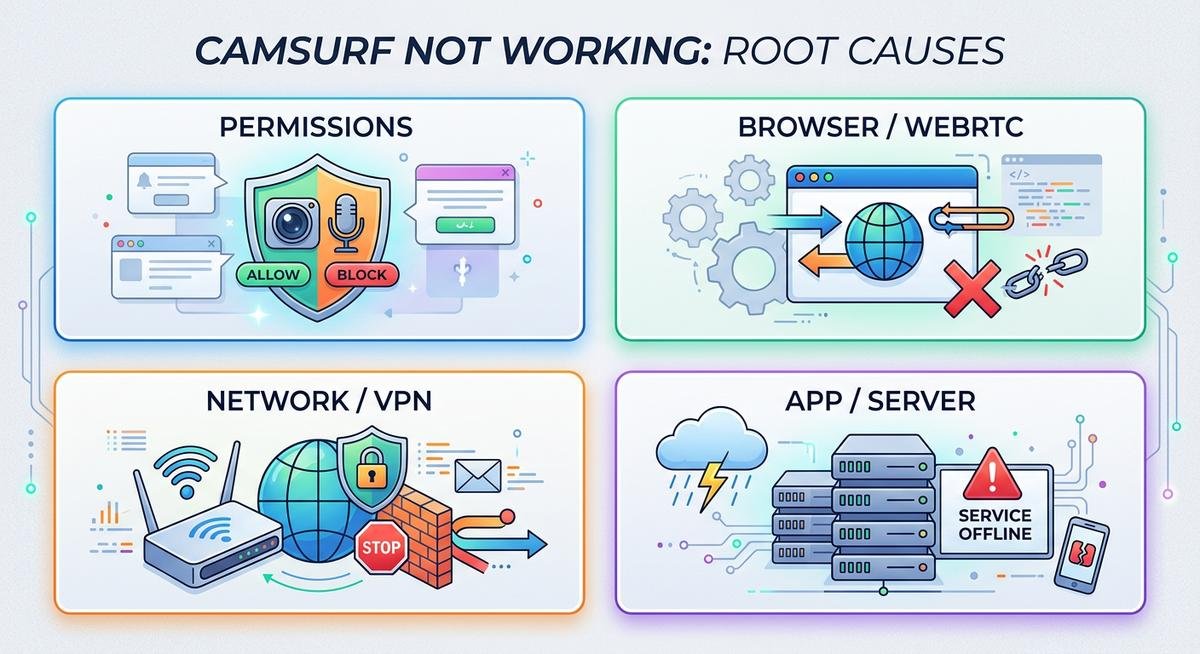
Most Camsurf error messages fall into three categories: permission-related issues where the browser blocks camera or microphone access, server-side problems when Camsurf experiences downtime, and client-side technical failures involving outdated browsers or corrupted cache. Understanding which category your error belongs to determines the fastest path to resolution.
Black Screen and Camera Issues
The black screen problem occurs when Camsurf cannot access your device camera. Browser permissions represent the primary culprit, especially after system updates that reset privacy settings. Chrome, Firefox, and Safari each handle camera permissions differently, requiring users to explicitly grant access through browser settings rather than page-level prompts.
Hardware conflicts emerge when multiple applications attempt simultaneous camera access. Close other video conferencing tools, streaming software, or any program using your webcam before launching Camsurf. Some antivirus programs also block camera access as a security measure, requiring whitelist exceptions for video chat platforms.
Connection Drops and Disconnections
The camsurf disconnected error appears when your internet connection drops below the minimum threshold required for real-time video streaming. Camsurf recommends at least 2 Mbps upload and download speeds for stable connections. Network instability, whether from Wi-Fi interference or cellular data fluctuations, triggers automatic disconnections to prevent poor user experiences.
Server-side disconnections happen when Camsurf detects multiple reports against your session. The platform employs automated moderation that immediately terminates connections when users click the report button multiple times. Three reports within a short timeframe often result in temporary connection blocks, even if the reports prove unfounded.
| Symptom | Likely Cause | Quick Fix |
|---|---|---|
| Black screen with error message | Camera permission denied | Check browser settings and grant camera access |
| Connection drops every 30 seconds | Unstable internet or VPN interference | Switch to wired connection or disable VPN |
| Cannot connect to any user | Server maintenance or regional outage | Check camsurf down status on DownDetector |
| Audio works but video freezes | Insufficient bandwidth or CPU overload | Close background applications and browser tabs |
| Instant disconnection on every match | Account flagged or shadowbanned | Wait 24-48 hours or contact support |
How to Fix a Camsurf Ban
Camsurf bans operate on multiple levels: temporary IP blocks lasting 24 hours, device-fingerprint bans persisting across sessions, and permanent account terminations for severe violations. The camsurf ban system uses browser fingerprinting technology that tracks device identifiers beyond simple IP addresses, making standard ban evasion techniques less effective than on other platforms.
Why Camsurf Bans Happen
Automated systems trigger most Camsurf bans without human review. The platform employs AI detection for inappropriate content, automated report tallying where multiple flags result in immediate bans, and behavioral analysis that identifies patterns associated with harassment or spam. According to video chat moderation standards published by the Internet Watch Foundation, automated systems maintain a 78% accuracy rate in content violation detection.
False positives represent a significant portion of camsurf ban complaints. Users wearing certain clothing, using specific camera angles, or having poor lighting sometimes trigger content filters designed to catch policy violations. The system also bans users who get reported frequently, regardless of whether those reports contain valid complaints.
Steps to Get Unbanned
Clearing your browser cache and cookies removes some tracking elements but rarely resolves device-level bans. The camsurf anti ban approach requires changing your digital fingerprint, which includes switching browsers, using incognito mode, and potentially accessing from a different device entirely. IP address changes through VPN services or mobile data provide temporary relief but carry detection risks.
Device-level bans prove most difficult to circumvent because Camsurf tracks hardware identifiers, browser configurations, and installed fonts to create unique fingerprints. Factory resetting mobile devices or using browser privacy extensions like Canvas Defender can disrupt fingerprinting attempts. However, these methods violate Camsurf terms of service and risk permanent account termination if detected.
The official appeal process requires contacting Camsurf support through their website contact form with your account email and ban details. Response times average 3-7 business days, and approval rates for ban appeals remain below 30% according to user reports on community forums. Include specific timestamps and detailed explanations to improve appeal success rates.
Camsurf App Missing from the App Store
The camsurf not on app store situation occurs periodically when Apple removes the application for policy violations or moderation concerns. Apple enforces strict guidelines for apps facilitating stranger communication, requiring robust content moderation systems and age verification mechanisms that random chat platforms often struggle to maintain consistently.
Why Apple Removes Random Chat Apps
Apple’s App Store Review Guidelines specifically target apps with user-generated content that lack adequate moderation. The company frequently removes random video chat applications following media reports linking these platforms to inappropriate content exposure. When camsurf deleted situations occur, the removal typically follows either user complaint surges or proactive audits by Apple’s app review team.
Regulatory pressure from child safety organizations influences these decisions. The National Center for Missing and Exploited Children reports that random chat platforms require continuous monitoring investments exceeding what many developers budget for. Apple prefers removing problematic apps rather than facing potential liability for hosting platforms associated with safety incidents.
Alternative Access When the App Is Gone
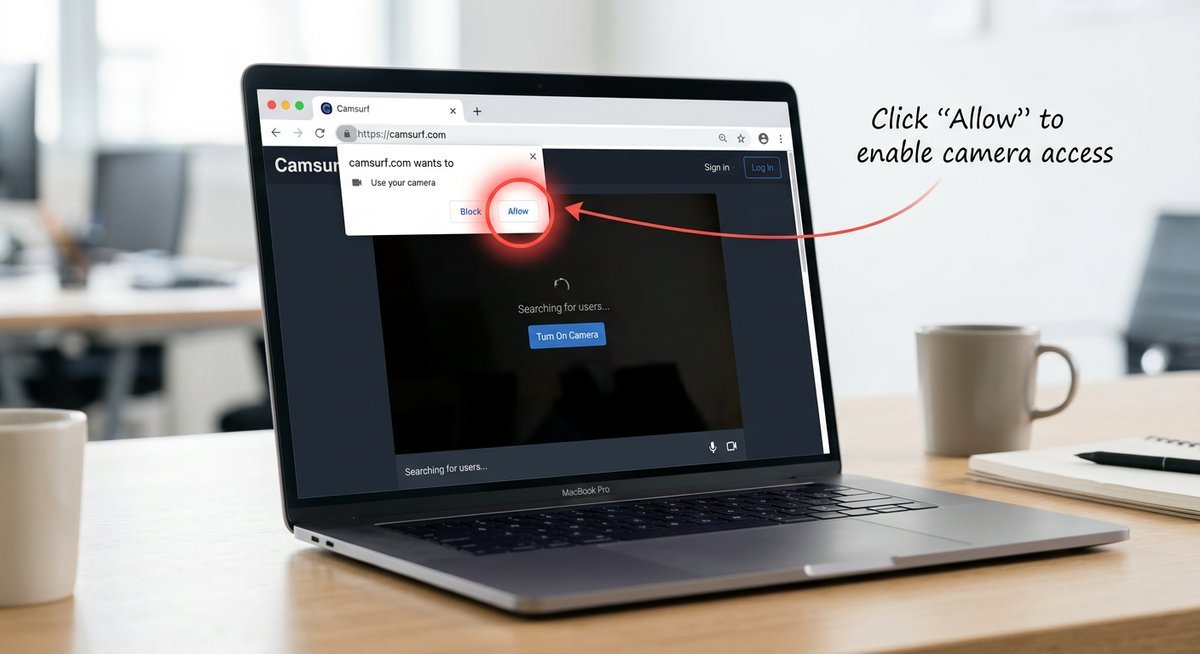
The web version at camsurf.com provides full functionality when the mobile app becomes unavailable. Browser-based access works on both desktop and mobile devices without requiring app store downloads. Mobile browsers like Safari and Chrome support WebRTC video chat, though users must grant camera and microphone permissions through browser settings.
Android users sometimes find the APK file available through third-party app repositories when Google Play removes the listing. However, installing apps from unknown sources carries security risks including malware, data theft, and compromised device integrity. Only download APK files from verified sources and understand that you assume full responsibility for any security consequences.
For users who previously installed the app before removal, existing installations continue functioning normally. App store removals prevent new downloads but do not deactivate apps already on devices. Check your purchase history or app library to reinstall from previously downloaded apps if you deleted it after the store delisting. Reference our complete Camsurf download and setup guide for detailed instructions on all access methods.
How to Cancel Camsurf Premium and Request a Refund
Canceling Camsurf Premium requires accessing the platform where you originally subscribed, whether through Apple App Store subscriptions, Google Play billing, or direct website payment. The camsurf cancel process does not happen within the Camsurf app itself but through your device’s subscription management system, which confuses users expecting in-app cancellation options.
Cancellation by Platform
iOS users must navigate to Settings, tap their Apple ID name, select Subscriptions, find Camsurf Premium, and tap Cancel Subscription. The cancellation takes effect at the end of the current billing period, not immediately upon request. Android users access Google Play Store, tap their profile icon, select Payments and Subscriptions, choose Subscriptions, locate Camsurf, and tap Cancel Subscription.
Web-based subscriptions purchased directly through Camsurf require logging into your account on the desktop site and accessing billing settings. PayPal subscribers must cancel through their PayPal account rather than through Camsurf. Credit card subscriptions often require contacting Camsurf support directly since some payment processors lack self-service cancellation interfaces.
Refund Process
The camsurf refund policy follows standard digital service terms: no refunds for services already rendered. Apple and Google maintain separate refund policies independent of Camsurf’s terms. Request Apple refunds through reportaproblem.apple.com within 90 days of purchase, explaining why the subscription did not meet expectations. Google Play refunds require submitting requests within 48 hours of purchase through the Play Store app.
Successful refund claims typically involve technical problems preventing service access, unauthorized charges from family members, or subscriptions that failed to deliver promised features. Banks sometimes process chargebacks for disputed charges, though this approach damages relationships with platform providers and may result in account termination across all services from that provider.
Frequently Asked Questions
Is Camsurf down right now?
Check real-time server status on DownDetector or IsItDownRightNow by searching for Camsurf outage reports. Server downtime typically lasts 15-45 minutes during maintenance windows, usually occurring between 2-4 AM EST when traffic reaches daily lows.
Regional outages affect specific geographic areas while leaving other regions operational. If DownDetector shows no widespread reports but you cannot connect, the issue likely stems from your local network, ISP routing problems, or account-specific restrictions rather than platform-wide camsurf down situations.
Why was Camsurf removed from the App Store?
Apple periodically removes random chat apps that fail moderation audits or receive high volumes of user safety complaints. The camsurf not on app store situation usually results from temporary policy enforcement rather than permanent bans, with apps often returning after developers implement required safety improvements.
App store removals serve as enforcement mechanisms compelling developers to strengthen content moderation. Camsurf has experienced multiple removal and reinstatement cycles across both Apple App Store and Google Play Store, reflecting ongoing tension between user freedom and platform safety requirements.
Is Camsurf unmoderated or unfiltered?
Camsurf employs automated moderation systems monitoring video streams for policy violations, but it is not completely unmoderated. Terms like camsurf unmoderated, camsurf unmonitored, camsurf unfiltered, and camsurf unrestricted misrepresent the platform’s actual moderation approach, which combines AI detection with user reporting mechanisms.
No video chat platform offers truly unmoderated experiences due to legal liability concerns and app store requirements. Camsurf’s moderation proves less intensive than competitors with human moderators reviewing every connection, but automated systems actively scan for prohibited content and ban violators. Users seeking unmoderated platforms should understand that such services operate in legal gray areas with significant safety risks.
Can I get unbanned from Camsurf?
Temporary bans expire automatically after 24-48 hours without requiring any action. Permanent camsurf ban situations require either successful support appeals or technical workarounds like device changes and IP address rotation, though these methods violate terms of service.
Appeal success depends on ban severity and violation type. First-time offenders with questionable bans have higher approval rates than repeat violators or accounts banned for clear policy violations. Provide detailed appeal explanations including timestamps and context to improve chances of ban reversal.
How do I cancel my Camsurf subscription?
Cancel through your device subscription settings rather than the Camsurf app. iPhone users cancel via Settings, Apple ID, Subscriptions, while Android users access Google Play Store, profile menu, Subscriptions. Cancellation stops future charges but maintains access until the current billing period ends.
The camsurf cancel process must occur at least 24 hours before renewal to prevent the next charge. Subscriptions canceled after the renewal processes do not qualify for automatic refunds, though you can request discretionary refunds through Apple or Google’s separate refund request systems. Learn more subscription management details in our comprehensive Camsurf review and feature overview.
When Nothing Else Works
Contact Camsurf support through their official website contact form when standard troubleshooting fails. Include specific error messages, screenshots, device information, and detailed descriptions of problems encountered. Support ticket responses typically arrive within 3-5 business days, though resolution times vary based on issue complexity.
Consider alternative random video chat platforms if persistent Camsurf problems continue unresolved. Similar services offer comparable functionality with different technical infrastructures and moderation approaches. Sometimes switching platforms provides immediate solutions when technical issues prove too complex or account-specific to resolve through standard support channels.
Last modified: March 22, 2026