Camsurf Review 2026: Features, Safety & Honest Verdict

Camsurf connects strangers face-to-face through random video chat, free and without mandatory registration, across more than 200 countries. The platform runs directly in a browser or through dedicated iOS and Android apps, pairing users in seconds with a single click. Unlike Omegle, which shut down permanently in November 2023 after years of safety controversies, Camsurf stakes its reputation on active AI moderation and enforced community guidelines.
That positioning matters more now than it did three years ago. The random video chat category lost its largest player overnight, and millions of former Omegle users scattered across alternatives with wildly different approaches to safety. Camsurf absorbed a visible share of that migration, partly because the webcam-based chat requires no account creation and partly because its moderation layer filters content in real time rather than relying exclusively on user reports.
The real question is whether Camsurf delivers on that promise in practice — and where the platform falls short. The answer depends on what you need: casual conversation, language practice, a premium upgrade for filtered matching, or simply a safe space to talk to strangers online.
What Is Camsurf and How Does It Work?
Camsurf is a free random video chat platform that pairs users with strangers worldwide via webcam — no account, no download, and no payment required to start a conversation in the browser version. The matching algorithm connects two people within seconds of clicking the Start button.
Random Video Chat Without Signup
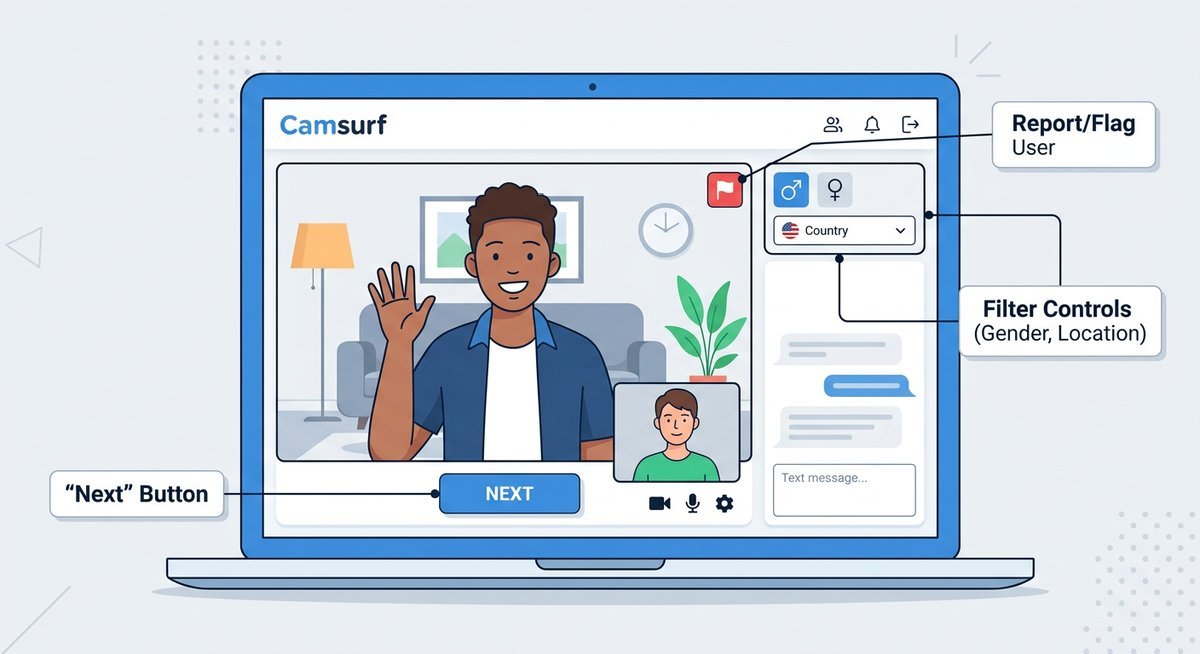
The mechanics are deliberately simple. A visitor lands on the Camsurf website, grants camera and microphone permissions through the browser prompt, and clicks Start. Within seconds, the platform connects a live video feed to a random stranger somewhere on the planet. No username. No profile photo. No registration form.
Each session is ephemeral. Clicking the Next button immediately disconnects the current chat and queues a new match, keeping the experience fluid and low-commitment. Users who prefer typing over speaking can use the text chat alongside the live video feed, a feature that keeps Camsurf accessible for people in shared spaces or those still warming up to face-to-face conversation with strangers.
Country and Language Filters
Before connecting, users can apply country and language filters — a feature that separates Camsurf from earlier-generation platforms offering purely random pairings with zero geographic control. Selecting a preferred region through the dropdown menu dramatically improves match relevance, which explains why language learners and international travelers show up frequently in the user base.
According to Camsurf’s published platform data, the service operates in over 200 countries with support for multiple interface languages. The Web Real-Time Communication (WebRTC) protocol handles the peer-to-peer video connection, which means no plugins or extensions are required — Chrome, Firefox, and most Chromium-based browsers handle the video stack natively.
Core Features: Free Video Call, Text Chat & Mobile Apps
Camsurf offers free HD video chat with optional text messaging, country and gender filters, and native mobile apps for both iOS and Android — all without requiring a paid subscription for core functionality. Premium features exist but are not gated behind a paywall for basic use.
| Feature | Free Tier | Premium Tier |
|---|---|---|
| Random video chat | Unlimited | Unlimited |
| Text chat alongside video | Yes | Yes |
| Country filter | Yes | Yes |
| Gender filter | Limited | Full access |
| Ad-free experience | No | Yes |
| Priority matching | No | Yes |
| Verified badge | No | Yes |
Browser-Based Video Chat
The Camsurf web version requires nothing beyond a modern browser with WebRTC support. No extension, no Flash player, no software download. That zero-friction approach is the platform’s strongest conversion point: a first-time visitor goes from landing page to live random video call in under 30 seconds.
Performance varies across browsers. Chrome and Firefox deliver the most reliable video and audio quality. Safari works but occasionally introduces latency, especially on older macOS versions. Microsoft Edge handles sessions cleanly on Windows 10 and later.
Mobile App on iOS and Android
The Camsurf app is available on the Apple App Store and Google Play Store. iOS requires version 13.0 or later; Android requires version 5.0 (Lollipop) or above. Both versions mirror the browser experience closely, with the addition of native push notifications and smoother camera switching between front and rear lenses.
The mobile app occasionally disappears from app stores due to policy reviews — a pattern common across random video chat apps that Apple and Google subject to stricter scrutiny than most categories. When unavailable on the App Store, the Camsurf website remains fully functional on mobile browsers as a fallback. Community discussions on Reddit and Telegram groups often track availability changes in real time.
Is Camsurf Safe? Moderation, Privacy & Age Policy
Camsurf employs a dual-layer moderation system combining real-time AI content detection with human review, making it one of the more actively policed random chat platforms in the category. No moderation system catches everything, but the layered approach puts Camsurf meaningfully ahead of platforms relying solely on user reports.

AI Moderation and Community Rules
The automated moderation scans live video feeds for policy violations — nudity, sexually explicit content, and harassment — and can interrupt or terminate a session without waiting for a manual report. A human review layer processes flagged accounts for potential bans. This dual-layer system is a genuine differentiator; most competing platforms deploy one mechanism or the other, not both simultaneously.
Community rules are explicit: no nudity or sexual content, no hate speech, no harassment, no sharing personal contact information to solicit minors, and no illegal activity. Violations can result in temporary suspension or permanent device-level bans. According to the Internet Watch Foundation (IWF), random video chat platforms with active AI moderation show significantly lower rates of policy-violating content compared to unmoderated alternatives — a finding that supports Camsurf’s investment in automated detection. The minimum age requirement is 13, though Camsurf itself recommends 18+ for unsupervised use.
Privacy and Data Collection
Camsurf collects standard operational data: IP address, device information, and session metadata including connection timestamps. According to Camsurf’s published privacy policy, live video chat sessions are not recorded or stored by the platform. No account creation is required for basic use, meaning no email address or real name is tied to a standard session.
| Data Type | Collected? | Stored Long-Term? |
|---|---|---|
| IP Address | Yes | Session logs only |
| Device Information | Yes | For moderation and banning |
| Chat Metadata (timestamps) | Yes | Limited retention period |
| Video or Audio Content | No | Not recorded |
| Real Name or Email | Only if account created | Only with voluntary signup |
Users seeking additional anonymity can route their connection through a commercial VPN service, which masks the originating IP address from Camsurf’s logs. The privacy policy is accessible directly from the website footer and is worth reviewing before a first session — particularly for users in jurisdictions with strict data protection regulations.
Camsurf vs Omegle, Chatroulette, OmeTV & Monkey
Camsurf holds a distinct position in the random video chat market: free entry, active moderation, and no mandatory account — a combination that none of its closest competitors match exactly. Omegle shut down permanently on November 8, 2023, after a lawsuit settlement, making the comparison historical but still relevant since millions of former users are actively seeking replacements.
| Feature | Camsurf | Omegle (defunct) | Chatroulette | OmeTV | Monkey |
|---|---|---|---|---|---|
| Status (2026) | Active | Shut down Nov 2023 | Active | Active | Active |
| AI Moderation | Yes (real-time) | Minimal | Yes | Yes | Yes |
| Account Required | No | No | No | Optional | Yes (phone) |
| Age Requirement | 13+ (18+ recommended) | 13+ | 18+ | 18+ | 17+ |
| Country/Language Filters | Yes (free) | Yes | Limited | Yes | No |
| Gender Filter | Yes (free/limited) | No | Paid only | Paid only | No |
| Text Chat | Yes | Yes | Yes | Yes | No |
| Mobile Apps | iOS and Android | None | iOS and Android | iOS and Android | iOS and Android |
| Browser Version | Yes | Yes | Yes | Yes | No |
| Free to Use | Yes | Yes | Yes (premium exists) | Yes (premium exists) | Yes (in-app purchases) |
Camsurf’s free gender filter stands out — Chatroulette and OmeTV charge for equivalent filtering, and Monkey does not offer it at all. For users who prioritize anonymity, Camsurf and Chatroulette both allow access without an account, while OmeTV encourages optional signup and Monkey requires phone verification. The trade-offs between privacy, content filtering, and matching quality across these platforms ultimately determine which one fits a specific use case.
Camsurf Premium: Is the Paid Upgrade Worth It?
Camsurf Premium removes ads, unlocks unrestricted gender filtering, and grants priority in the matching queue — priced at roughly $5 to $20 per month depending on subscription length and regional pricing. The free tier handles core video chat without limitations, so the upgrade targets users who want more control over who they meet.
The most tangible benefit is the gender filter without daily caps. Free users get limited access to this filter, which resets periodically. Premium removes that restriction entirely and adds a verified badge to the user’s feed, which can improve match acceptance rates. According to user reports compiled on community forums, the ad-free experience alone noticeably improves session flow on mobile devices, where banner ads occasionally overlap the video feed.
Whether the premium subscription justifies its cost depends on usage patterns. Casual users who chat once or twice a week will find the free tier perfectly adequate. Daily users who rely heavily on gender and country filters may see enough quality-of-life improvement to justify the monthly spend.
Getting Started: Camsurf Setup in Under 60 Seconds
New users can start a random video call on Camsurf in under a minute — the setup process requires no download on desktop and only a standard app install on mobile. Camera and microphone permissions are the single most common sticking point for first-time users.
- Open the platform. Navigate to camsurf.com in any modern browser, or download the Camsurf app from the Apple App Store or Google Play Store.
- Allow camera and microphone access. The browser or app will prompt for permissions on first visit. Click Allow — blocking this prompt is the number one reason new users see a black screen instead of a video feed.
- Set your filters. Select a preferred country or language from the dropdown menus above the Start button. This step is optional but dramatically improves match relevance.
- Click Start. The platform connects a live video feed to a random stranger within seconds. Hit Next to skip to a new match at any time.
- Adjust your environment. Position a light source in front of you, not behind. A well-lit face and a neutral background keep matches engaged longer than a dark silhouette.
The complete step-by-step download and setup guide covers platform-specific instructions for iPhone, Android, PC, and browser, including troubleshooting for common permission issues.
Frequently Asked Questions
What is Camsurf?
Camsurf is a free random video chat platform that connects users face-to-face with strangers worldwide through webcam or mobile camera, with no account required. The service runs in web browsers and as native apps on iOS and Android, using AI-powered moderation to enforce community guidelines in real time.
Is Camsurf safe to use?
Camsurf is safer than most unmoderated alternatives thanks to its dual-layer system of AI content detection and human review. No random video chat platform can guarantee a completely safe experience, but Camsurf’s active moderation, device-level banning, and enforced community rules reduce exposure to inappropriate content significantly compared to platforms that rely only on user reports.
Is Camsurf free?
Yes, Camsurf is completely free for core video and text chat, including country and limited gender filters. A premium subscription exists for ad-free chatting, unrestricted gender filtering, and priority matching, but no payment is required to use the platform’s primary features.
Is Camsurf legit?
Camsurf is a legitimate video chat platform with apps listed on Google Play and periodically on the Apple App Store. The service has operated since the mid-2010s and maintains an active user base across more than 200 countries. Community discussions on Reddit consistently confirm the platform functions as advertised.
What is Camsurf used for?
Most users use Camsurf for casual conversation with strangers, language practice with native speakers from other countries, and social connection during periods of isolation. Some users treat it as a dating discovery tool, though Camsurf is not marketed as a dating app and does not offer profile-based matching.
Is Camsurf safe for kids?
Camsurf sets its minimum age at 13 but officially recommends 18+ for unsupervised use. Random video chat platforms inherently carry risk for minors, regardless of moderation quality. Parents should supervise any use by children under 18 and consider whether the random-stranger format is appropriate for their child’s age and maturity level.
What are Camsurf’s rules?
Camsurf prohibits nudity, sexual content, hate speech, harassment, sharing personal contact information to solicit minors, and any illegal activity. Violations result in temporary suspension or permanent device-level bans. The full community guidelines are published on the Camsurf website and displayed during app onboarding.
Does Camsurf work in the USA, UK, and other countries?
Camsurf operates in over 200 countries including the United States, United Kingdom, Brazil, Indonesia, Malaysia, and throughout Europe. The platform supports multiple interface languages and allows users to filter matches by country, making it functional for users regardless of geographic location.
Can I use Camsurf in English?
Yes, Camsurf’s default interface language is English, and the language filter allows users to match specifically with English-speaking partners. The platform also supports Spanish, Portuguese, Turkish, Hindi, and several other languages through both the interface and the matching filter system.
Why was Camsurf removed from the App Store?
Apple periodically removes random video chat apps during safety policy reviews, a pattern that affects Camsurf and competitors alike. Removals are typically temporary. When the iOS app is unavailable, the Camsurf website works fully on mobile Safari as a browser-based alternative. The troubleshooting guide covers app availability issues and workarounds in detail.
Verdict
Camsurf occupies a defensible niche: free random video chat with enough moderation to keep the experience usable for mainstream users. The zero-signup browser access, country and language filters, and cross-platform availability (web, iOS, Android) make it one of the most accessible options in a category that lost its dominant player when Omegle went offline.
The weak spots are real. Moderation catches most violations but not all. The premium tier adds convenience features rather than transformative functionality. App Store availability fluctuates unpredictably. And the platform’s privacy protections, while adequate, depend on users understanding what data is and is not collected.
For casual users who want spontaneous video conversations with strangers and prefer a platform that at least attempts to enforce basic decency standards, Camsurf remains a solid first choice in 2026. For users who need more filtering granularity or stricter content policies, the alternatives comparison above provides a starting point for evaluating other options.
Last modified: March 22, 2026