How to Self-Host Revolt Chat with Docker: Complete Guide
A self-hosted Revolt Chat instance runs entirely on your own hardware — every message, file, and user record stays under your direct control with zero third-party data exposure. The full stack deploys via a single docker compose up -d command, spinning up six containers: the Rust-powered API backend, Bonfire WebSocket server, Autumn file proxy, MongoDB database, Redis cache, and MinIO object storage. If you are new to Revolt Chat, the Revolt Chat platform overview covers the full feature set and privacy architecture before you dive into deployment.
The official self-hosting repository at github.com/stoatchat/self-hosted (2,300+ GitHub stars) provides the reference docker-compose.yml and environment configuration. This guide walks through hardware requirements, the full annotated compose file, environment variable setup, reverse proxy configuration, and the common failure points that trip up first-time deployers.
Prerequisites and System Requirements
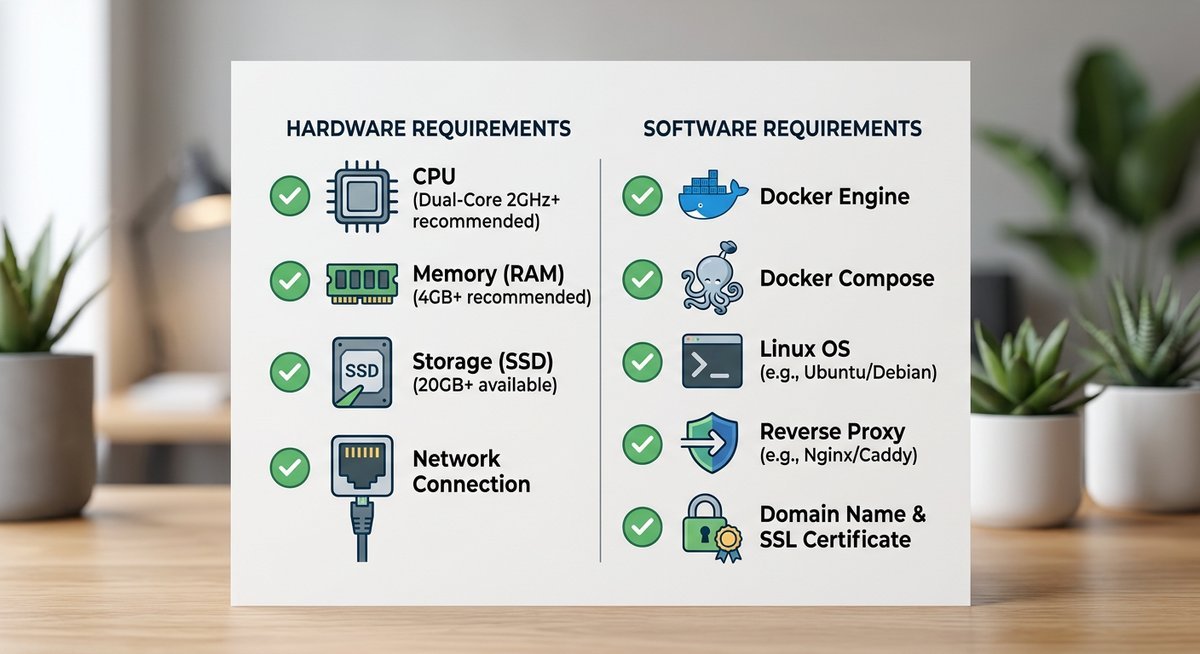
A production-ready Revolt Chat Docker deployment needs at least 2 GB RAM, 1-2 CPU cores, and 20 GB disk space. Under-provisioned hardware causes MongoDB and Bonfire restart loops before you ever see a login screen — get the baseline right first.
Hardware Specifications
According to MongoDB’s official production notes, a single-node MongoDB instance requires a minimum of 1 GB RAM — meaning the full Revolt stack needs well beyond that floor. The practical recommendation is 4 GB RAM for a responsive instance under real user load.
| Resource | Minimum | Recommended | Notes |
|---|---|---|---|
| RAM | 2 GB | 4 GB | MongoDB + Redis are the heaviest consumers |
| CPU | 1 core | 2 cores | ARM64 (Raspberry Pi 4) supported |
| Disk | 20 GB | 40 GB+ | MinIO storage grows with file attachments |
| OS | Any Linux with Docker | Ubuntu 22.04 LTS / Debian 12 | Docker Engine v24+ and Compose v2 required |
A Raspberry Pi 4 with 4 GB RAM handles a small community (under 50 concurrent users) comfortably, provided you use a USB-attached SSD instead of a microSD card. Disk I/O is the bottleneck on ARM hardware, not CPU.
Required Software
Docker Engine v24+ and Docker Compose v2 plugin are non-negotiable. The older standalone docker-compose binary has compatibility gaps with modern compose syntax. Verify both:
docker --version        # Expect: Docker version 24.x or higher
docker compose version  # Expect: Docker Compose version v2.x
A registered domain name pointed at your host’s public IP is also required — Revolt Chat serves its web frontend over HTTPS, and TLS certificates need a valid domain for automatic issuance via Let’s Encrypt.
Understanding the Revolt Docker Architecture
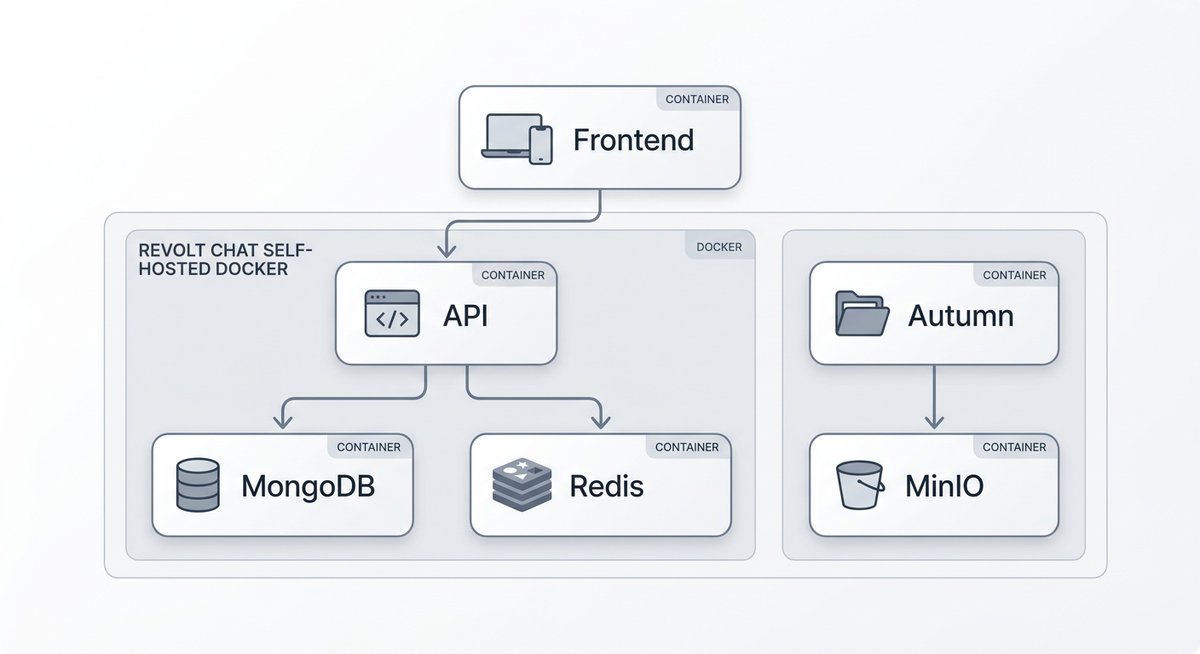
A complete self-hosted Revolt Chat deployment runs six containers, each handling one layer of the stack. Understanding the architecture before editing configuration files prevents the most common debugging time sinks.
Container Roles and Communication
The backend API (revoltchat/server) handles every REST call — authentication, message history, channel management. Bonfire (revoltchat/bonfire) maintains WebSocket connections for real-time message delivery. Autumn (revoltchat/autumn) proxies file uploads between the API and MinIO, the S3-compatible object storage engine that keeps all attachments on your hardware.
| Container | Image | Role | Persists Data? |
|---|---|---|---|
| API Backend | revoltchat/server | REST API, authentication, business logic | No (stateless) |
| WebSocket Server | revoltchat/bonfire | Real-time event delivery | No (stateless) |
| File Proxy | revoltchat/autumn | Upload/download routing to MinIO | No (delegates to MinIO) |
| Web Frontend | revoltchat/revite | Browser UI (Solid.js/TypeScript) | No (stateless) |
| Database | mongo:6 | Users, messages, channels, servers | Yes (named volume) |
| Object Storage | minio/minio | File attachments, avatars, emoji | Yes (named volume) |
Why Redis Matters
Redis handles session token caching and pub/sub messaging between the API and Bonfire. Without Redis, the WebSocket server cannot reliably invalidate sessions or broadcast events across API processes. It is the connective tissue that makes real-time messaging work — and the Alpine image (redis:7-alpine) keeps the layer size under 30 MB.
All containers share a single internal Docker bridge network. Each service resolves others by name: the API reaches MongoDB at mongodb:27017 and Redis at redis:6379. No database port needs external exposure.
Setting Up docker-compose.yml and .env
Two files control the entire deployment: docker-compose.yml defines every container and its relationships, and .env injects secrets and URLs at runtime. Clone the official self-hosted repository for the reference configuration, then customize with the variables below.
Essential Environment Variables
| Variable | Description | Example Value |
|---|---|---|
REVOLT_PUBLIC_URL | Public-facing API URL. Mismatches here cause CORS errors. | https://api.revolt.example.com |
MONGODB_URI | MongoDB connection string using Docker service name. | mongodb://mongodb:27017/revolt |
REDIS_URI | Redis connection for session caching and pub/sub. | redis://redis:6379 |
MINIO_ROOT_USER | MinIO admin username. | revolt_admin |
MINIO_ROOT_PASSWORD | MinIO admin password (8+ characters required by MinIO). | str0ng_s3cret_key |
VAPID_PRIVATE_KEY / VAPID_PUBLIC_KEY | Web Push notification keys. Generate with Node.js. | See generation command below |
Generate VAPID keys with a single Node.js command:
node -e "const {generateVAPIDKeys} = require('web-push'); console.log(generateVAPIDKeys());"Lock down the .env file permissions immediately: chmod 600 .env. Leaving it world-readable on a shared host is a genuine security exposure.
Launching the Stack
With both files in place, start everything in detached mode:
docker compose up -dVerify all containers reached running state with docker compose ps. If any container shows “restarting,” check its logs with docker compose logs [service-name] — the most common culprits are MongoDB connection timeouts (RAM too low) and CORS mismatches (REVOLT_PUBLIC_URL not matching the actual domain).
Reverse Proxy and TLS Configuration
Revolt Chat requires HTTPS with valid TLS certificates. A reverse proxy sits in front of the Docker containers, terminates SSL, and routes traffic to the correct internal port. Caddy, Traefik, and Nginx Proxy Manager all work — the critical requirement is WebSocket upgrade support for the Bonfire event server.
Caddy (Simplest Option)
Caddy handles automatic HTTPS with zero configuration for certificate renewal. A minimal Caddyfile:
revolt.example.com {
    reverse_proxy /api/* localhost:3000
    reverse_proxy /ws   localhost:9009
    reverse_proxy /autumn/* localhost:3003
    reverse_proxy localhost:5173
}
The /ws route must reach Bonfire on port 9009 with WebSocket upgrade headers intact. Caddy handles this automatically — no additional configuration needed.
Common Reverse Proxy Mistakes
- WebSocket upgrades not forwarded: Bonfire requires
Connection: Upgradeheaders. Nginx users must addproxy_set_header Upgrade $http_upgradeandproxy_set_header Connection "upgrade"explicitly. - REVOLT_PUBLIC_URL mismatch: The URL in
.envmust exactly match the domain the reverse proxy serves. Trailing slashes, http vs https, and subdomain mismatches all trigger CORS failures. - Ports 80/443 blocked: Let’s Encrypt HTTP-01 challenges require port 80 open. Firewall rules or ISP blocks will cause certificate issuance to fail silently.
Frequently Asked Questions
What are the minimum requirements to self-host Revolt Chat?
A self-hosted Revolt Chat Docker deployment requires at least 2 GB RAM, 1-2 CPU cores, and 20 GB disk space. The recommended setup is 4 GB RAM with an SSD for storage. A Raspberry Pi 4 with 4 GB RAM and USB SSD is a viable budget host for small communities.
How do I set up HTTPS for my self-hosted Revolt instance?
Point your domain’s DNS A record at the server, then configure a reverse proxy (Caddy, Traefik, or Nginx) to terminate TLS with automatic Let’s Encrypt certificates. The reverse proxy must forward WebSocket upgrade headers to Bonfire on port 9009, or real-time messaging will silently fail.
How do I update my self-hosted Revolt containers?
Run docker compose pull && docker compose up -d to fetch updated images and recreate containers with minimal downtime. Pull images before stopping the stack to reduce the offline window to seconds. Pin to specific image tags in docker-compose.yml if you need stability over bleeding-edge updates.
Can I deploy Revolt Chat on Kubernetes?
Yes. Community-maintained Helm charts exist for Kubernetes deployment, though the official self-hosting documentation primarily covers Docker Compose. Kubernetes is best suited for teams that need horizontal scaling, automated failover, or integration with existing cluster infrastructure. For most small to mid-size communities, Docker Compose is simpler and sufficient.
Why self-host Revolt Chat instead of using the hosted version?
Self-hosting gives complete data sovereignty — every message, file, and metadata record stays on infrastructure you physically control. For organizations with GDPR obligations or teams handling sensitive communications, self-hosting eliminates third-party data exposure entirely. The AGPL-3.0 license guarantees the right to deploy and modify the code.
Next Steps
A self-hosted Revolt Chat instance puts complete control of your community’s data on your own infrastructure. The Docker Compose deployment covered here handles all six services — API, WebSocket, file storage, database, cache, and frontend — with under 2 GB RAM at idle on modest hardware.
After your first successful login, explore the admin panel for user management and server configuration. If anything goes wrong during or after setup, the Revolt Chat troubleshooting guide covers the most common failure points. For extending your instance with automated moderation or custom integrations, the Revolt Chat bots and API guide walks through bot development on self-hosted deployments. Keep the stack current with docker compose pull && docker compose up -d whenever new releases drop.
Last modified: March 26, 2026