Revolt Chat Bots: API, Plugins & Builder Guide

Revolt chat bots, API plugins, and builder tools give developers a fully open-source, self-hosted chat platform with a capable bot API — one that lets you build automated bots using familiar patterns from the Discord ecosystem, without the proprietary restrictions. The platform has quietly attracted a growing developer community building everything from moderation tools to music bots, all authenticated via bot token authentication against Revolt’s REST and WebSocket endpoints.
The Revolt.js client library is the most actively maintained wrapper for Node.js developers, while Revolt.py serves the Python crowd with a clean async interface. Server owners who just want to add existing bots to their communities have a different path entirely — and it’s simpler than most expect.
Regardless of where you’re starting from — zero coding experience, a production-grade bot you want to port from Discord, or a server you want to automate — the Revolt bot API covers more ground than its documentation lets on. Slash commands and event listeners, plugin architecture, deployment on a VPS or cloud platform, token security: all of it is accessible once you know where to look.
Understanding the Revolt Bot API and How It Works
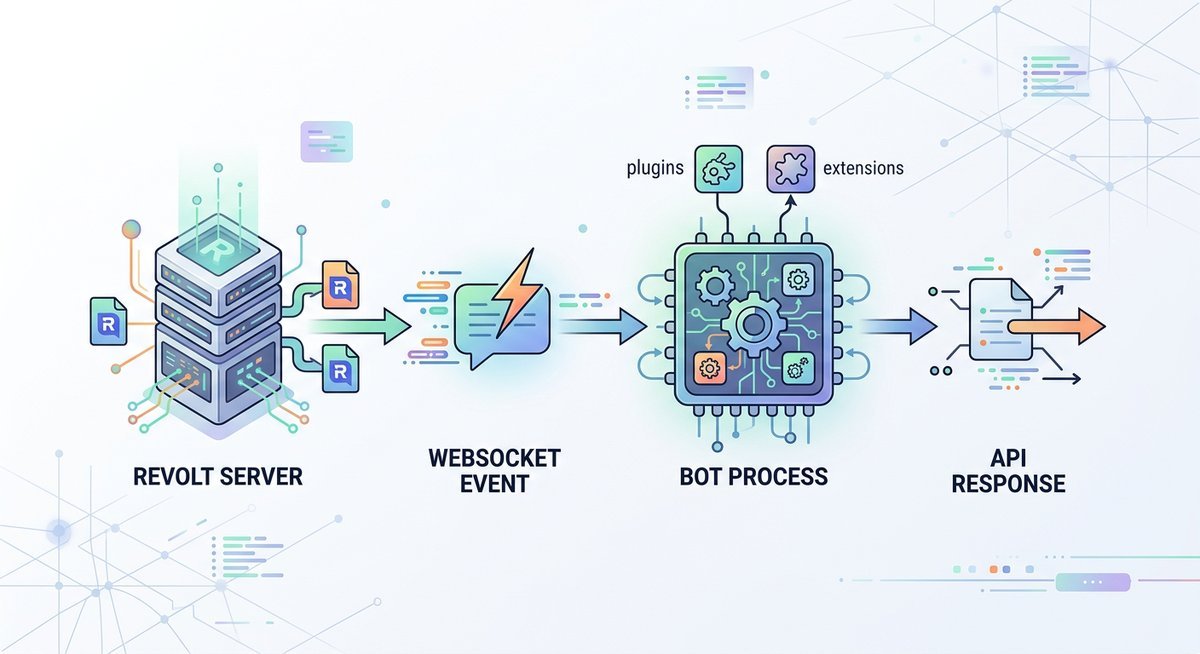
Revolt’s bot API gives developers programmatic access to a self-hosted chat platform automation layer built on a RESTful HTTP interface combined with a persistent WebSocket connection. Bots authenticate via a single bot token, receive real-time events over that socket, and respond through standard HTTP endpoints — a model that will feel immediately familiar to anyone who has shipped a Discord bot. The Revolt API is documented publicly in the RevoltChat GitHub organisation’s API repository.
Bot Tokens and Authentication
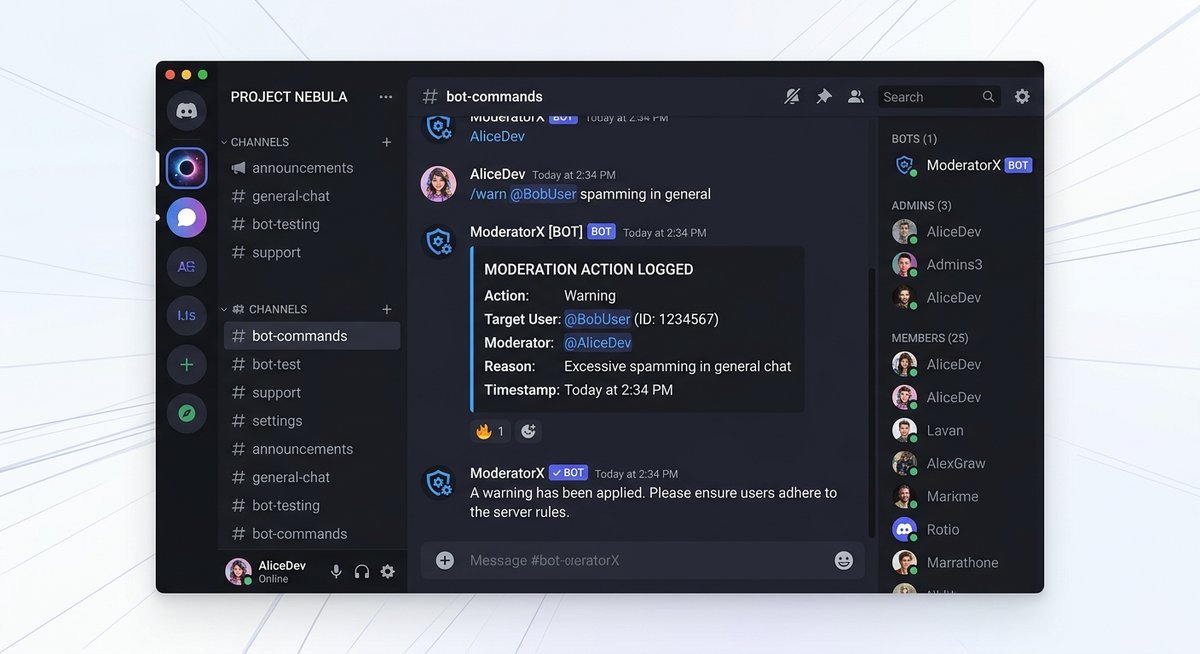
Creating a bot on Revolt starts inside the Revolt web app: navigate to Settings → My Bots, click “Create a Bot,” and Revolt generates a unique bot token tied to that account. That token is the only credential the API accepts — every outbound HTTP request must include it as an x-bot-token header.
In practice, the token grants full account-level access. Store it exclusively in environment variables or a secrets manager; never commit it to a public repository. A leaked token means an attacker can post messages, join servers, and read channel history as your bot with zero additional authentication required.
| Authentication Step | Where It Happens | Key Detail |
|---|---|---|
| Generate token | Revolt Settings → My Bots | One token per bot account |
| Authenticate REST calls | HTTP header | x-bot-token: YOUR_TOKEN |
| Authenticate WebSocket | Initial Authenticate payload | Sent immediately after socket open |
| Token storage | Server environment only | Never in source code or public repos |
Events, Slash Commands, and Permissions
Revolt dispatches real-time data through a WebSocket event model where every action — a new message, a member join, a channel update — arrives as a typed JSON payload. Bots register event listeners against these payload types; the Revolt.js client library, for example, exposes an on('message', handler) pattern that maps directly onto the underlying socket events.
Unlike Discord’s slash command system, Revolt currently handles bot interactions primarily through message-based command parsing rather than a dedicated slash command registration endpoint. Developers implement prefix-based routing (!ping, !ban) inside their message event listeners — a simpler model, though one that shifts more parsing logic onto the bot itself.
Permission scopes on Revolt are channel- and server-level flags: SendMessages, ManageMessages, KickMembers, and roughly two dozen others. A bot only receives the permissions explicitly granted when a server owner adds it — making permission design a security consideration worth planning before deployment, not after.
Choosing Your Library: Revolt.js vs Revolt.py vs Alternatives
For most developers, Revolt.js is the strongest starting point for building Revolt chat bots with API plugins. The Revolt.js client library is the most actively maintained wrapper, ships with full TypeScript support, and mirrors Discord.js conventions closely enough that anyone migrating from Discord bot development will feel at home within minutes. Revolt.py is the better pick for Python shops, particularly those building data-heavy or ML-adjacent bots.
Revolt.js
The Revolt.js client library is the official JavaScript and Node.js wrapper for the Revolt API, maintained directly under the RevoltChat GitHub organisation. TypeScript definitions ship out of the box, which means your IDE catches type errors before they become runtime bugs. Bot token authentication, event listeners, and command handling all follow patterns that Discord.js veterans will recognise immediately, dramatically reducing onboarding time for teams already running self-hosted chat platform automation.
Best use cases include real-time moderation bots, interactive command-heavy bots, and any project where a JavaScript-first team wants fast iteration cycles.
Revolt.py
Revolt.py is an async Python library built on asyncio, offering a clean Pythonic API with strong type annotations throughout. The library handles bot token authentication and exposes an event-listener model that feels native to Python developers rather than ported from another ecosystem. Data-heavy bots — think logging pipelines, analytics dashboards, or bots that call external APIs — benefit from Python’s rich data science ecosystem sitting right alongside the bot logic.
Revolt.py suits teams already running Python infrastructure who want to avoid context-switching languages for their self-hosted chat platform automation.
Other Wrappers (revolt.rs, Voltage)
Developers with specific performance or language requirements aren’t limited to the two main options. revolt.rs is a community-maintained Rust wrapper suited for high-throughput bots where memory efficiency matters. Voltage is another community library targeting developers who prefer a different abstraction layer over the raw Revolt API.
| Library | Language | TypeScript / Typing | Maintenance | Best For |
|---|---|---|---|---|
| Revolt.js | JavaScript / Node.js | Full TypeScript support | Actively maintained (official) | Command bots, moderation, Discord migrations |
| Revolt.py | Python (asyncio) | Strong type annotations | Community maintained | Data-heavy bots, ML integrations |
| revolt.rs | Rust | Native Rust typing | Community maintained | High-throughput, low-memory bots |
| Voltage | Various | Varies | Community maintained | Alternative abstraction preferences |
Step-by-Step: Build Your First Revolt Bot
A working Revolt bot requires four things: a bot account, a token, a library, and roughly 20 lines of code. The complete setup — from empty folder to a bot that responds to commands — is covered below for both JavaScript and Python.
Setting Up Your Project (Revolt.js)
Start by initialising a Node.js project and installing the Revolt.js client library. The package ships with full TypeScript definitions, so autocomplete works out of the box in VS Code.
- Run
npm init -yinside a new project folder. - Install the library:
npm install revolt.js. - Create
index.jsat the project root and add the snippet below. - Store your bot token in a
.envfile and load it withdotenv— never hard-code it.
// index.js — minimal Revolt.js ping bot
import { Client } from "revolt.js";

const client = new Client();

// Bot token authentication via environment variable
client.on("ready", () => console.log(`Logged in as ${client.user.username}`));

// Event listener for incoming messages
client.on("messageCreate", (message) => {
  if (message.content === "!ping") {
    message.channel.sendMessage("Hello! 🏓 Pong!");
  }
});

client.loginBot(process.env.BOT_TOKEN);
Run the bot with node index.js. The messageCreate event fires on every message the bot can see, making it the foundation for slash commands and event listeners in more complex bots.
Setting Up Your Project (Revolt.py)
Python developers get an async-first experience with Revolt.py. Install it via pip, then scaffold a bot in under 20 lines.
- Install the library:
pip install revolt.py. - Create
bot.pyand paste the snippet below. - Export your token as an environment variable:
export BOT_TOKEN=your_token_here.
# bot.py — minimal Revolt.py ping bot
import revolt
import asyncio
import os

class MyClient(revolt.Client):
    # Event listener fires when bot is ready
    async def on_ready(self):
        print(f"Logged in as {self.user.name}")

    # Respond to the !ping command
    async def on_message(self, message: revolt.Message):
        if message.content == "!ping":
            await message.channel.send("Hello! 🏓 Pong!")

async def main():
    async with MyClient(os.environ["BOT_TOKEN"]) as client:
        await client.start()

asyncio.run(main())
Revolt.py’s async architecture means the bot handles multiple simultaneous messages without blocking — a practical advantage for self-hosted chat platform automation at any scale.
| Step | Revolt.js (Node.js) | Revolt.py (Python) |
|---|---|---|
| Install | npm install revolt.js | pip install revolt.py |
| Entry file | index.js | bot.py |
| Token auth method | client.loginBot(token) | Client(token) constructor |
| Message event | messageCreate | on_message |
| Runtime | Node.js ≥ 16 | Python ≥ 3.9 |
Adding Your Bot to a Revolt Server
Once the bot is running locally, it needs a home. Revolt’s bot invite flow is handled entirely through the platform’s web dashboard rather than a separate OAuth portal.
- Open Revolt.chat, navigate to Settings → My Bots, and select your bot.
- Copy the bot’s unique user ID from the dashboard.
- Construct an invite URL in this format:
https://app.revolt.chat/bot/{BOT_USER_ID}. - Open that URL while logged into Revolt, choose the target server from the dropdown, and confirm.
- Assign the bot a role with the minimum permissions it needs — at minimum, Read Messages and Send Messages.
Revolt’s permission system mirrors Discord’s role-based model closely, so developers familiar with that ecosystem will find the scopes intuitive. Restrict permissions to exactly what the bot requires — over-permissioned bots are a common security oversight on any self-hosted chat platform.
Finding Existing Revolt Bots and Plugins
Not every server owner wants to build a bot from scratch — and they should not have to. The Revolt ecosystem already has a growing library of community-built bots covering moderation, utilities, and entertainment, though discovering them requires knowing where to look since no centralized bot marketplace exists yet.
Where to Discover Revolt Bots
The primary discovery channels for existing Revolt bots are the Revolt Lounge community server (the official community hub where bot developers showcase their projects), the RevoltChat GitHub organisation, and community-curated lists maintained in dedicated servers. Unlike Discord’s top.gg ecosystem, Revolt does not yet have a centralized bot directory with install counts and user reviews — which is both a limitation and an opportunity for developers building in the space.
The Stoat bot discovery platform is an emerging directory that aggregates community-built bots with descriptions and invite links. It is still early-stage, but it represents the closest equivalent to Discord’s bot listing ecosystem. Developers who publish their bots on Stoat and the RevoltBots GitHub organisation get significantly more visibility than those who only share in private servers.
Popular Bot Categories
| Category | What’s Available | Maturity Level |
|---|---|---|
| Moderation | Auto-moderation, word filters, raid protection, logging | Several stable options available |
| Utility | Polls, reminders, server stats, welcome messages | Growing selection |
| Music | Audio playback from YouTube and other sources | Experimental — voice API still maturing |
| Fun / Games | Trivia, mini-games, meme generators | Several community projects active |
| Developer Tools | GitHub notifications, CI/CD alerts, webhook bridges | Functional but requires setup |
The honest reality: if you need a specific bot right now and it does not exist for Revolt, you will either build it yourself using the revolt.js or Revolt.py libraries covered above, or wait for the community to catch up. The ecosystem is roughly where Discord’s was in 2016-2017 — capable infrastructure with a small but growing developer community. For teams evaluating Revolt’s bot landscape against Discord’s, the Revolt Chat vs Discord comparison covers the ecosystem gap in detail.
Hosting and Deploying Your Revolt Bot
A bot that only runs on your laptop dies every time you close the lid. Production deployment means running the bot on infrastructure that stays online 24/7 — and the good news is that Revolt bots are lightweight enough to run on free-tier cloud platforms for small to medium servers.
Free and Low-Cost Hosting Options
| Platform | Free Tier | Best For | Limitation |
|---|---|---|---|
| Railway | $5 free credit/month | Quick deployment from GitHub | Credits run out on heavy usage |
| Render | Free web service tier | Always-on background workers | Free tier spins down after inactivity |
| VPS (Hetzner, DigitalOcean) | From ~$4/month | Full control, multiple bots | Requires server management knowledge |
| Self-hosted alongside Revolt | No additional cost | Bot on same server as your Revolt instance | Adds load to your existing infrastructure |
Deployment with Docker
Docker is the most reliable deployment method for Revolt bots — especially if you are already running a self-hosted Revolt Chat instance via Docker. A minimal Dockerfile for a Revolt.js bot:
FROM node:20-alpine
WORKDIR /app
COPY package*.json ./
RUN npm ci --production
COPY . .
CMD ["node", "index.js"]
Build and run with two commands:
docker build -t my-revolt-bot .
docker run -d --restart unless-stopped -e BOT_TOKEN=your_token my-revolt-bot
The --restart unless-stopped flag ensures the bot automatically recovers from crashes or server reboots. For bots running alongside a self-hosted Revolt instance, add the bot container to the same docker-compose.yml file and connect it to the Revolt network — the bot can then resolve internal service names directly.
Keeping Your Bot Token Secure in Production
Three rules that prevent the most common security mistakes:
- Never commit tokens to Git. Add
.envto.gitignorebefore your first commit. If a token has ever been pushed to a public repository — even briefly — regenerate it immediately from Revolt’s bot dashboard. - Use environment variables, not config files. Every hosting platform (Railway, Render, Docker) supports environment variable injection. Store the token there, not in a
config.jsonsitting in your source tree. - Rotate tokens periodically. Revolt’s bot dashboard lets you regenerate tokens with one click. Rotation limits exposure window if a token leaks through logs, error reports, or misconfigured CI pipelines.
Frequently Asked Questions
How do I create a bot for Revolt chat using the API?
Go to the Revolt web dashboard under Settings → My Bots, click “Create a Bot,” and copy the generated bot token. Authenticate using that token via the Revolt.js client library (client.loginBot(token)) or Revolt.py (Client(token)). Store the token in a .env file — never commit it to a public repository.
What is the best library for building Revolt bots — Revolt.js or Revolt.py?
Revolt.js is the better choice for JavaScript and TypeScript developers: it’s officially maintained by the RevoltChat organisation and mirrors Discord.js syntax. Revolt.py is stronger for Python developers building data-heavy or automation-focused bots. The right pick depends on your team’s language and whether you need Python’s data ecosystem or Node.js’s event-loop performance.
Are there plugins available for Revolt chat bots?
Yes. The RevoltBots GitHub organisation and the Stoat bot discovery platform both host community bots and open-source projects covering moderation, music, utilities, and more. Because most are open-source, you can fork any of them as a plugin starting point for your own self-hosted chat platform automation project.
Is Revolt’s bot API similar to Discord’s bot API?
The architecture is comparable — both use bot token authentication, WebSocket event listeners, and message-based command handling — but Revolt’s API is simpler and less feature-complete than Discord’s mature platform. Developers migrating from Discord will find the core concepts familiar while needing to adjust for Revolt-specific permission scopes, endpoint structures, and the absence of a native slash command registration system.
Where can I host a Revolt bot for free?
Railway offers $5 in free monthly credits, and Render provides a free-tier web service suitable for lightweight bots. For teams already running a self-hosted Revolt instance via Docker, adding the bot as an additional container in the same docker-compose.yml costs nothing beyond the existing server resources. A $4/month VPS from Hetzner or DigitalOcean handles multiple bots comfortably.
How do I find existing bots to add to my Revolt server?
Check the Revolt Lounge community server, the RevoltBots GitHub organisation, and the Stoat bot discovery platform. No centralized bot marketplace like Discord’s top.gg exists yet, so community servers and GitHub searches are the primary discovery channels. Most available bots cover moderation, utility, and fun categories.
| Question | Quick Answer |
|---|---|
| Where do I get a bot token? | Revolt dashboard → Settings → My Bots |
| Best library for JavaScript? | Revolt.js (official, TypeScript support) |
| Best library for Python? | Revolt.py (async, strongly typed) |
| Free hosting option? | Railway or Render free tier |
| Plugin discovery platform? | Stoat or RevoltBots GitHub org |
Wrapping Up
Building a Revolt bot is genuinely approachable once you understand the moving parts. Bot token authentication gives you secure access to the API, the Revolt.js client library or Revolt.py handles the heavy lifting of slash commands and event listeners, and a plugin architecture keeps your codebase clean as complexity grows.
The fastest path forward is the starter code snippets covered earlier — a working !ping bot takes under 20 lines. From there, the RevoltBots GitHub organisation and the Stoat discovery platform are the best places to explore community work and avoid reinventing the wheel.
The Revolt bot ecosystem is still early — which is exactly what makes it interesting for developers looking to build something that matters. On Discord, your bot competes with thousands of established alternatives. On Revolt, a well-built moderation bot or a clean webhook integration can become the go-to tool for an entire community. Deploy it, share it on the Revolt Lounge and RevoltBots GitHub, and contribute back to a platform that is genuinely open.
Last modified: March 26, 2026